Image Map

Friday, June 20, 2014

Tellagami

Our librarian loves to use Voki with our kiddos. And I have to say: our kids respond well to Voki. But with the rise of iPads in our school, I thought it might be nice to know about an app version.

The app is called Tellagami, and it's free to download.


Tellagami works a lot like Voki, except there are only male and female options {no aliens or animals like Voki offers}.

Customize skin color, hair color and style, clothing, eye color, and even head size.


There aren't too many customization options -- for the female avatar, there were about 4 top options in 3-4 colors each in clothing, for instance -- but it's enough to get the job done.

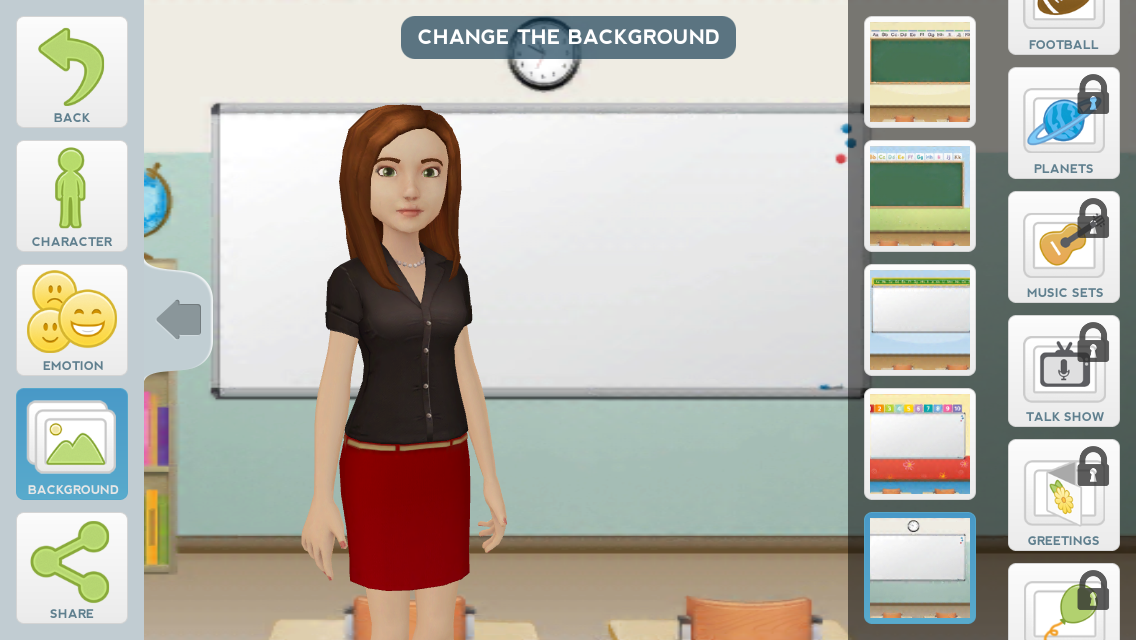
Once your avatar looks the way you need him/her to, move on to customizing the background.

The app comes with 2 free sets of backgrounds {"free" and "road trip"}, but there are plenty of other background packs you can purchase if you so choose. I particularly liked the educational backgrounds. One of the edu sets appeared to be for college, while the other set was geared more toward elementary; the elementary backgrounds have alphabet/color borders above the blackboard and brighter colors.

 I chose to customize the emotion of my avatar after my background. Choose from 7 emotions:


Finally, add some speech. You can either record your own voice, or type something in and choose from a dozen or so male and female voices.

Preview your Tellagami to make sure he/she sounds the way you need it to, and then share your creation. I like that you can share on social media sites + e-mail + text messages.


I e-mailed it to myself to see if I could figure out how to embed it on my blog, and wouldn't you know it? Clicking the link in the e-mail takes you to a screen that offers a link to the video and an embed code. Yay! Here's my sample Tellagami:


One thing I love about this app is that you don't have to have an account in order to save anything.  Just open the app, create, and send. I don't see a way to edit the Tellagami after it's made, so that may be the only drawback I see so far.

For reference, the maximum length of time for a recording on Tellagami is 30 seconds {which is the same for Voki, if I remember correctly...?}.

Ideas for using Tellagami or Voki in the classroom:

  1. As a getting-to-know-you activity, all students could create a Voki or Tellagami to represent themselves. The avatar could speak essential information, favorites, etc. about themselves, and then al students could play their creation for the class. 
  2. After reading, students could create a Tellagami or Voki project to summarize what they read. 
  3. After reading a story, students could pick their favorite character and create an avatar that speaks from that character's POV.
  4. On a similar note, students could create an avatar of a famous person or a historical figure; the avatar could speak facts about that person's life and achievements. 
  5. After writing a story, students could make an avatar of their choosing, and then use the call-in feature to read their story to world.
  6. Instead of always posting things to your classroom website in words, create a Voki or Tellagami video to get the information across. For instance, I once embedded a Voki into a class blog entry and used it to prompt students on their next assignment. {I included text, too, in case students didn't have speakers available, but this is a good option in the paperless classroom for those kiddos that may struggle with reading or just prefer verbal instruction.}

Thursday, June 19, 2014

Go Noodle

Go Noodle is a brain break website for elementary students (and maybe intermediate, depending on the maturity level). The website is comprised of short videos -- some from YouTube, and some from the makers of Go Noodle -- that you can play during class when your students need a little break.
You could find some of these videos on YouTube, but since they're shown on the Go Noodle website, the videos are free from distracting and potentially inappropriate ads.

Some of the videos let students practice academic skills while moving their bodies. For instance, the  "Freeze It" video lets kids dance while the music is playing, and then shout something out when the music stops. There are lots of options for what you want the kids to do when the music is "frozen:"


Some of the videos are meant to get the wiggles out. 


Other videos are meant to be calming. 


You can sort by the type of video you're looking for, or you can browse the entire library of videos and choose based on what the kids want to play or how much time you have to spare:


This page is a quick reference guide to all the videos available, and this page has an explanation of all the games Go Noodle offers. There is a pretty good variety, so you should be able to find just what your students need.

To use Go Noodle, you have to sign up for a free account. When you sign up, you can create a class


or use the Demo class to help you get acquainted with the website.


Go Noodle allows your class to choose a character to "workout" with them, so your class can watch their character's muscles grow. 


Once you grow a character to its maximum, the class can choose another character to work with. 

Go Noodle also keeps track of how long your students have been active. {This is how the character knows when it can grow.} After active video sessions, students will see the Go Noodle background logo and their total time spent working out. 


You also get a reminder about how many minutes you've spent working out {and how many minutes you have left before you get to the next level} on your home page -- along with a fun, random fact that you can change any time by clicking the character:


Bonus: it looks like our district has access to Go Noodle Plus for free. :)

I have yet to personally use Go Noodle, but you can bet I'll be using it this coming school year! I have a few friends who have used Go Noodle in their class, and I have heard nothing but positive things about it. A friend said her 4 year-old loves it as well as her 4th graders!

Monday, June 2, 2014

Personal Success Stories from Twitter

I've now used a classroom Twitter both as a secondary teacher and as an elementary teacher. I've been satisfied with how this social media has reached students and their families in both instances. Below are 5 of my favorite stories from using Twitter in the classroom.


1. My first year of teaching was at a Title I school in Oklahoma. I taught 8th grade ELAR. Most of my students did not have Internet access or smart phones, but the majority of them did have unlimited text messaging plans. At the beginning of the year, we went down to the computer lab, and I showed students how to access our class Twitter and connect their cell phone so that they received a text every time I tweeted. 

One young lady in my class was involved in pretty much every club, sport, and organization the school had to offer. Every Thursday night, I tweeted a reminder to study for the Friday vocabulary quiz. Every Friday, this young lady would come in and ace the quiz. 

At the end of the year, I found out that she always forgot about the vocabulary quiz until Thursday nights, when she received my reminder tweet. She would inevitably be on the bus, coming home from some after school, extra-curricular event, and her phone would buzz with my tweet. She would study all the way home, which gave her enough information to pass the quizzes with flying colors the next day. 
Via
2. Also when I was teaching 8th grade, I had a young man who had a rough home life. As a result, did didn't get much sleep at night and would frequently go to the back corner of my classroom to nap. Because I knew about his situation, I would pick and choose which times I would tap him awake; I tried to let the poor kid at least get a power nap in. :( 

At the time of this story, my class was reading a novel. Although the novel was on his desk, the book was closed, and I was sure he wasn't listening at all. That night I sent a tweet to the effect of, "If you're bored with the novel, hang on! Tomorrow's chapter gets exciting!" Class the next day came and went, and he never said a word. But that night, I tweeted to my students to ask them what they thought of that "exciting" chapter. He actually tweeted a reply: replied, "I don't like reading, but you were right. That chapter was good!" I wore a grin like the Cheshire cat all night long after reading that:) I would have never even have known he was paying attention that day had he not sent that tweet. I used Twitter to draw him into classroom novel discussions for the rest of the year. 

Via
3. Also while teaching 8th grade, I had a parent who was very concerned about the well-being and success of her son. Her son rarely opened up to her, but she was desperate for a glimpse into his personal and school life. I helped her connect to our class Twitter, and she was able to see all of my updates. Doing this helped ease the tension between her and her son because she no longer had to pry information out of him {about my class, anyway}.

4. When I taught freshman English, I was having trouble with my classes saying rude things to each other. I genuinely believed my students meant no harm in saying what they did; they simply didn't think about how their words sounded before saying them. Because of this, I was on a kick about tweeting "life lessons" and "character motivations." One Tuesday night, I randomly tweeted that a "Wednesday Challenge" would begin the next day. Their challenge was to say something nice to every person they talked to that day. No students replied on Twitter or mentioned it in class that morning. I spoke to a fellow teacher at the end of school, and she said one of her students (we'll call him "R") said something strange in class. He's normally a very quiet kid, but today, he was complimenting all his classmates. The coworker asked, "What's gotten into you today, R?" He smiled and said, "It's part of Mrs. K's Wednesday Challenge!" ...This helped me remember that just because you don't get a reply doesn't mean people aren't reading

Photo Credit: Caro Wallis via photopin cc
5. One evening, I tweeted something about challenging my students to do something nice for a stranger over the weekend and included a #PayItForward hashtag. One of my kids replied, asking what "pay it forward" means. I got the opportunity to explain the concept. That term would probably have never come up in my day-to-day teaching, but social skills are an important issue that need to be taught! Because of Twitter, I was able to squeeze in that little "mini lesson" to all who "followed" me. And even though I replied to that one student about the meaning of "pay it forward," all the other students could read the reply, so I felt like I was explaining it to them, too.  

Photo Credit: Ed Yourdon via photopin cc
If those are the cool things I saw as a result of Twitter, can you imagine what I missed?? 


Here are my other blog posts about Twitter, in case you want to check them out: